A deep-dive technical and business guide to the SNOWBELT, SNOWGLAZE, and SNOWBASIN malware components — how they work, who is at risk, and the exact steps to protect your organization
Published by CelereTech | Managed IT & Cybersecurity | Chicago, IL | May 2026
⚠ ACTIVE THREAT — APRIL 2026: Google’s Threat Intelligence Group (GTIG) and Mandiant confirmed this campaign is live and ongoing. First observed in December 2025, it has been documented targeting businesses across manufacturing, professional services, finance, and healthcare. 77% of recent victims were senior employees and executives.
Executive Summary
In April 2026, Google’s Threat Intelligence Group (GTIG) and Mandiant published research on one of the most sophisticated — and practically dangerous — cyberattack campaigns targeting businesses today. A previously unknown threat group, designated UNC6692, has been deploying a custom, modular malware framework called the SNOW suite against business targets worldwide using Microsoft Teams as the primary attack vector.
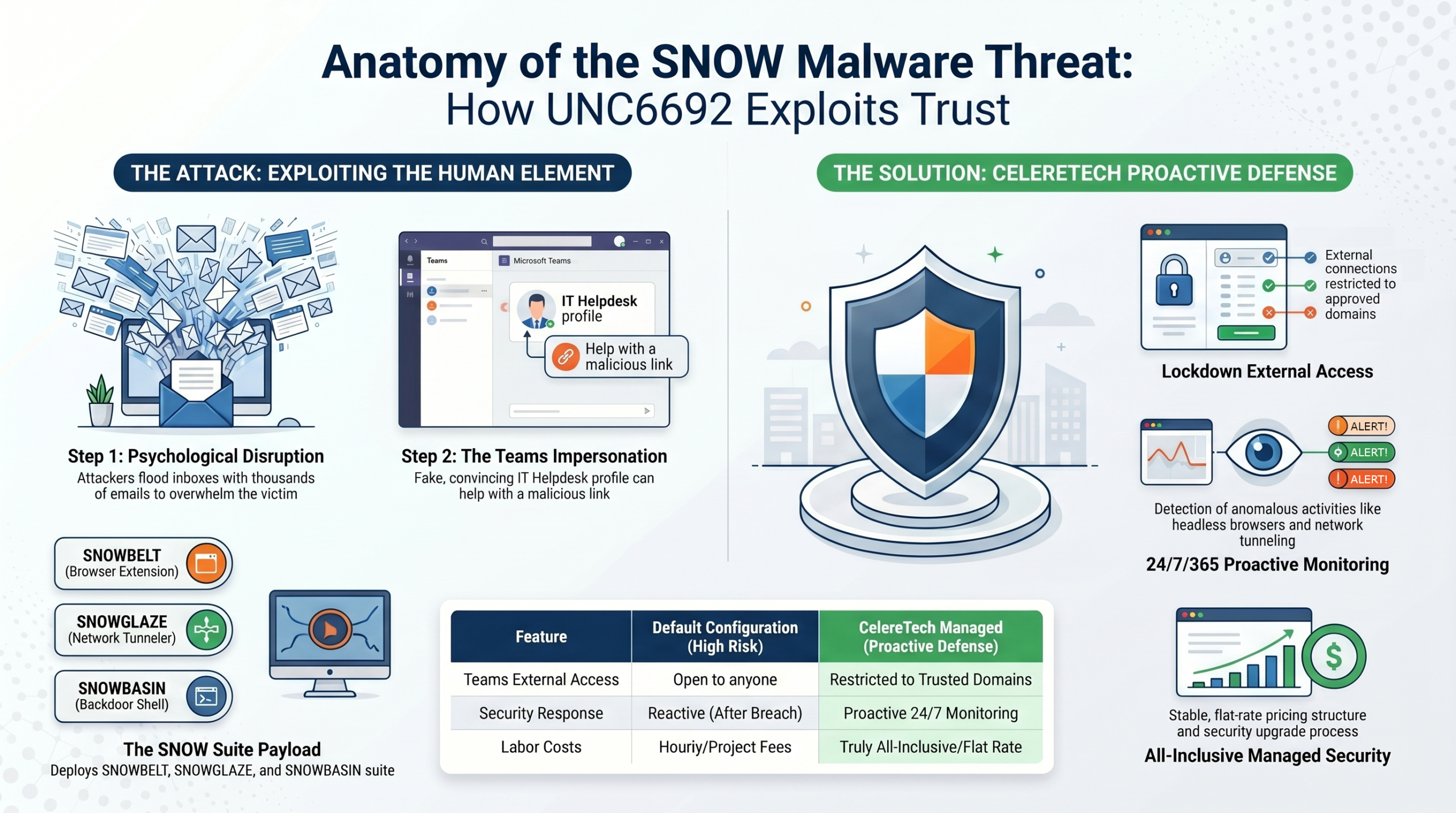
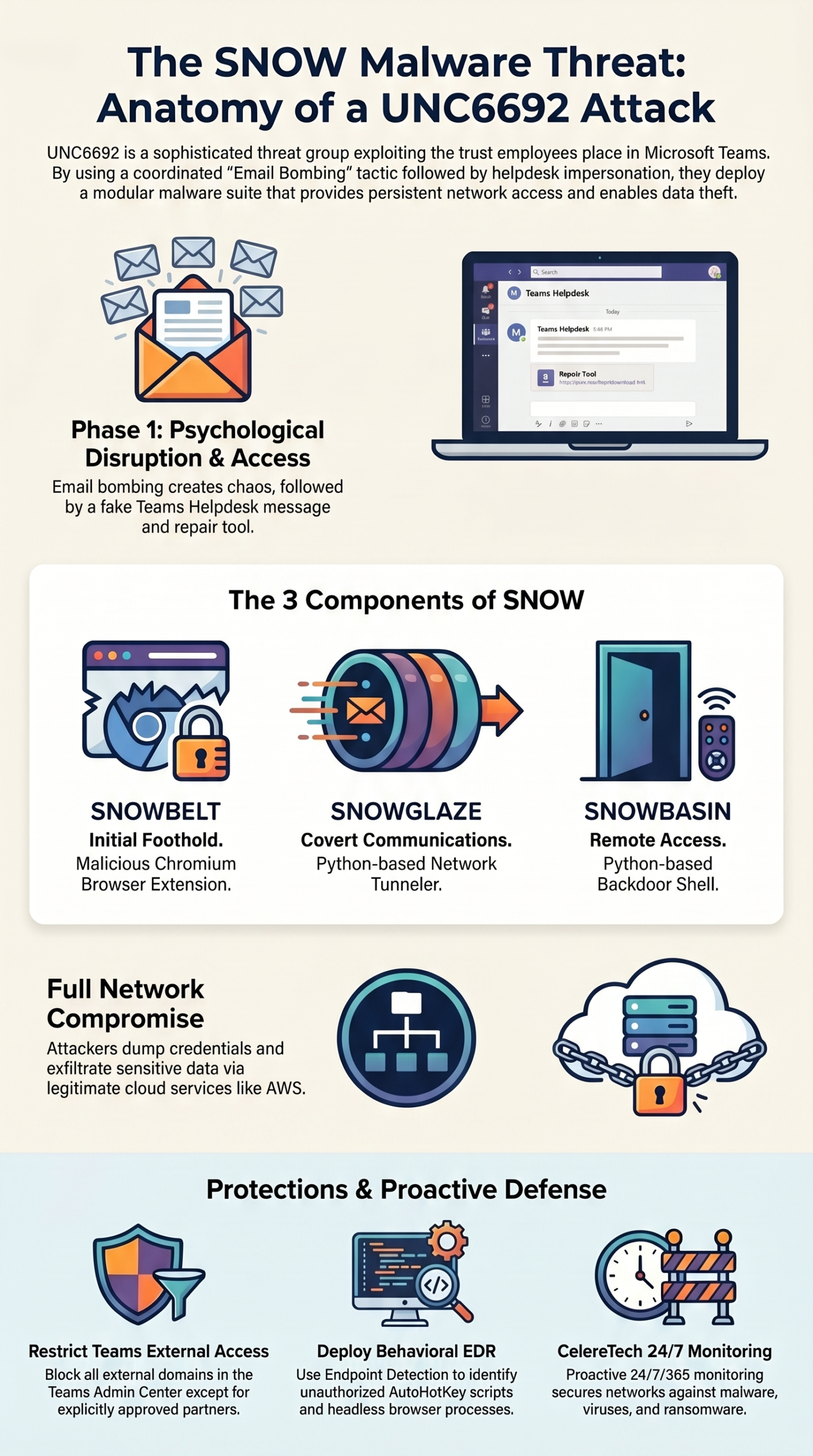
The SNOW suite consists of three purpose-built components: SNOWBELT (a malicious browser extension), SNOWGLAZE (a Python-based network tunneler), and SNOWBASIN (a Python-based remote access backdoor). Together, they give attackers persistent, covert access to corporate networks — including the ability to dump Active Directory credentials, move laterally across systems, and exfiltrate sensitive data through attacker-controlled cloud infrastructure.
What makes this campaign uniquely dangerous is not its technical sophistication alone. It is the deliberate exploitation of trust — specifically, the trust employees place in Microsoft Teams and IT helpdesk support personnel. The attack requires no software vulnerability, no zero-day exploit, and no stolen password to initiate. It requires only a convinced employee.
This article explains what the SNOW malware suite is, how UNC6692’s attack chain works step by step, what the real-world consequences are, why small and mid-sized businesses are particularly at risk, and exactly what to do to protect your organization.
What Is UNC6692?
UNC6692 is a newly tracked threat actor, first identified by Mandiant in late December 2025 when the campaign was observed in active operation. The group’s geographic origin and ultimate attribution have not been publicly confirmed as of this writing, though the sophistication of both the tooling and the social engineering tradecraft suggests a well-resourced, organized operation.
The naming convention — SNOW, SNOWBELT, SNOWGLAZE, SNOWBASIN — follows the “UNC” (Uncategorized) designation Mandiant uses for newly identified threat clusters that have not yet been attributed to a known actor or nation-state. The campaign has drawn comparisons to techniques previously associated with former Black Basta ransomware affiliates, though UNC6692’s specific payload delivery mechanism represents a novel evolution of those tactics. [1][4]
Key fact: The email bombing + IT helpdesk impersonation sequence is not entirely new — but UNC6692’s use of a custom browser-extension-based malware suite delivered via a Teams phishing link, rather than a remote management tool, represents a documented evolution of this attack class that security researchers describe as genuinely novel. [6]
The SNOW Malware Suite: A Component-by-Component Breakdown
The SNOW malware suite is a purpose-built, modular toolkit in which each component serves a distinct role in the intrusion chain. Mandiant describes them as forming ‘a coordinated pipeline that facilitates an attacker’s journey from initial browser-based access to the internal network of the organization.’ [1]
SNOWBELT — The Browser Extension Backdoor (Initial Foothold)
SNOWBELT is a malicious Chromium browser extension — the first component installed on the victim’s machine and the foundation of the entire operation. It is delivered not through the Chrome Web Store, but silently via a dropper executed from the phishing page. It installs itself under benign-sounding names such as ‘MS Heartbeat’ or ‘System Heartbeat’ to avoid detection. [2][4]
Technically, SNOWBELT is a JavaScript-based Service Worker that:
- Communicates with attacker C2 infrastructure using an authenticated WebSocket (REGISTRY_WEBSOCKET_URL)
- Receives encrypted commands via browser Push notifications, enabling the attacker to ‘wake up’ the extension asynchronously without constant polling
- Relays decrypted commands (command, buffer, flush, commit) to SNOWBASIN via HTTP POST requests to the local server on port 8000
- Uses AES-GCM encryption and time-based domain generation algorithms (DGAs) for resilient, covert communications
- Runs in a headless Microsoft Edge instance — an invisible browser process the user never sees — launched by a scheduled task and Windows Startup shortcut for persistence [1][3]
SHA-256 hash (SNOWBELT service worker): 7f1d71e1e079f3244a69205588d504ed830d4c473747bb1b5c520634cc5a2477
SNOWGLAZE — The Python Network Tunneler (Covert Communications)
SNOWGLAZE is a cross-platform Python-based tunneling utility downloaded by SNOWBELT after initial access is established. Its primary function is to create an encrypted, authenticated communication channel between the compromised machine and the attacker’s command-and-control (C2) infrastructure. [1][2]
SNOWGLAZE’s capabilities include:
- Establishing a WebSocket Secure (WSS) tunnel to a Heroku-hosted C2 server (e.g., wss://[heroku-subdomain].herokuapp.com:443/ws)
- Encapsulating all traffic in JSON with Base64 encoding to blend with normal encrypted HTTPS web traffic
- Providing SOCKS proxy services — effectively turning the compromised machine into a network pivot point from which the attacker can reach internal systems
- Enabling arbitrary TCP traffic to be routed through the victim’s machine, making it appear as legitimate internal traffic to network monitoring tools
The use of Heroku subdomains and AWS S3 buckets as C2 relay points is deliberate: traffic to these widely-used cloud platforms is rarely blocked or flagged in corporate network environments. [3][4]
SHA-256 hash (SNOWGLAZE): 2fa987b9ed6ec6d09c7451abd994249dfaba1c5a7da1c22b8407c461e62f7e49
SNOWBASIN — The Python Backdoor Shell (Persistent Remote Access)
SNOWBASIN is a Python-based bindshell — a persistent backdoor that runs a local HTTP server on port 8000 and accepts attacker commands relayed through the SNOWBELT/SNOWGLAZE pipeline. With SNOWBASIN active, the attacker has interactive remote access to the victim’s machine. [1][2]
SNOWBASIN enables:
- Execution of arbitrary PowerShell and cmd.exe commands on the compromised host
- Remote shell access with full interactive capability
- Screenshot capture and local file staging for exfiltration
- File download and upload operations
- Self-termination command to shut down the backdoor and reduce forensic traces on demand
SHA-256 hash (SNOWBASIN): c8940de8cb917abe158a826a1d08f1083af517351d01642e6c7f324d0bba1eb8
The Complete UNC6692 Attack Chain: Step by Step
Phase 1: Email Bombing
The attack begins with a coordinated flood of emails delivered to the target’s inbox — potentially hundreds or thousands within minutes. Subscription confirmations, forum registrations, newsletters, and miscellaneous spam are used. The goal is not infection via email; it is psychological disruption. The victim is overwhelmed, confused, and urgently seeking help — exactly the state of mind UNC6692 needs. [1][6]
Phase 2: Microsoft Teams Impersonation
Almost simultaneously with the email flood, the victim receives a Microsoft Teams chat invitation or message from an external account impersonating an IT helpdesk employee. The message is empathetic and reassuring, referencing the email chaos and offering immediate assistance. Because Teams is perceived as a trusted internal platform — and because the timing feels like genuine rapid response from IT — the victim is highly likely to engage. [1][8a][8b][10]
Phase 3: Credential Harvesting via Fake Repair Tool
The ‘helpdesk agent’ directs the victim to click a URL for a fake ‘Mailbox Repair and Sync Utility’ hosted on attacker-controlled AWS S3 buckets. The page is sophisticated: it validates the victim’s email address from a URL parameter, verifies the victim is using Microsoft Edge, presents a professional enterprise-style interface, uses a ‘double-entry’ credential capture mechanism — presenting the password prompt twice, appearing to reject the first attempt to confirm the password is valid — and displays a convincing animated progress bar while the real attack unfolds in the background. [1][5]
Phase 4: AutoHotKey Payload Execution and SNOWBELT Installation
While the victim watches the progress bar, the page silently downloads an AutoHotKey (AHK) binary and script. AutoHotKey is a legitimate Windows automation tool — its use is not inherently suspicious and many enterprise environments have it installed. The AHK script executes, launching a headless Microsoft Edge process with the malicious SNOWBELT browser extension loaded. Scheduled tasks and a Windows Startup folder shortcut are created for persistence. The entire process is invisible to the user. [1][3][7]
Phase 5: SNOWGLAZE and SNOWBASIN Deployment
SNOWBELT, now running as a persistent headless browser extension, downloads the remaining SNOW suite components: SNOWGLAZE (the Python tunneler) and SNOWBASIN (the backdoor shell), along with additional AutoHotKey scripts and a portable Python runtime environment. The attacker now has covert, persistent, encrypted access to the victim’s machine. [1][2]
Phase 6: Internal Reconnaissance and Lateral Movement
With SNOWBASIN providing shell access routed through the SNOWGLAZE tunnel, UNC6692 begins systematic reconnaissance: a Python script scans the internal network for open ports 135, 445, and 3389 (SMB, Windows file sharing, RDP). PsExec is used to execute processes on remote hosts via SMB admin shares. RDP sessions are established through the SNOWGLAZE tunnel to reach backup servers and domain controllers. [1][3][5]
Phase 7: Credential Dumping and Active Directory Compromise
Using Windows Task Manager, UNC6692 dumps LSASS process memory to extract NTLM credential hashes, which are then used in Pass-the-Hash attacks to authenticate to the domain controller without needing plaintext passwords. Once on the domain controller, the threat actor downloads a ZIP archive containing FTK Imager — a legitimate forensic imaging tool — and uses it to mount the local storage drive and extract the Active Directory database file (ntds.dit), along with the SAM, SYSTEM, and SECURITY registry hives, writing them to the domain administrator’s Downloads folder. The extracted files are then exfiltrated via LimeWire. [1][5]
Phase 8: Data Exfiltration
Harvested credentials, Active Directory database files, and other sensitive data are exfiltrated through LimeWire and attacker-controlled cloud infrastructure, including Amazon Web Services S3 buckets. The use of legitimate cloud platforms makes this traffic difficult to distinguish from normal business activity. [1][3][5]
MITRE ATT&CK Techniques Observed in This Campaign
The following MITRE ATT&CK techniques have been documented in connection with UNC6692 and the SNOW malware suite. Security teams should use these as the basis for detection rule development and threat hunting: [7]
| Tactic | Technique ID | Technique Name |
| Initial Access | T1566.003 | Phishing: Spearphishing via Service (Microsoft Teams) |
| Execution | T1204.001 | User Execution: Malicious Link |
| Execution | T1059.010 | Command and Scripting Interpreter: AutoHotKey & AutoIT |
| Execution | T1059.001 | Command and Scripting Interpreter: PowerShell |
| Execution | T1059.003 | Command and Scripting Interpreter: Windows Command Shell |
| Execution | T1059.006 | Command and Scripting Interpreter: Python |
| Execution | T1176.001 | Browser Extensions |
| Persistence | T1053.005 | Scheduled Task/Job: Scheduled Task |
| Persistence | T1547.009 | Boot or Logon Autostart Execution: Shortcut Modification |
| Command & Control | T1572 | Protocol Tunneling (SNOWGLAZE WebSocket tunnel) |
| Command & Control | T1090 | Proxy: SOCKS Proxy (SNOWGLAZE pivot capability) |
| Credential Access | T1003.001 | OS Credential Dumping: LSASS Memory |
| Credential Access | T1003.002 | OS Credential Dumping: Security Account Manager |
| Credential Access | T1003.003 | OS Credential Dumping: NTDS |
| Lateral Movement | T1550.002 | Use Alternate Authentication Material: Pass-the-Hash |
| Lateral Movement | T1021.001 | Remote Services: Remote Desktop Protocol |
| Lateral Movement | T1021.002 | Remote Services: SMB/Windows Admin Shares (PsExec) |
Why Small and Mid-Sized Businesses Are Particularly at Risk
The SNOW campaign is not exclusively targeting enterprise organizations. The attack methodology is specifically effective against SMBs for several compounding reasons:
Default Microsoft Teams external access
Most SMBs deploy Microsoft 365 with default settings, including Teams external access that allows anyone outside the organization to send messages to employees. This is the open channel UNC6692 exploits. [9][10]
Security awareness training gaps
Most SMB employee security training focuses on email phishing. Very few programs specifically train employees to be skeptical of IT helpdesk contact through Teams, or to recognize the email bombing + Teams message combination as a coordinated attack. [6][8a][8b]
High-value data with limited defenses
Law firms, accounting practices, financial advisors, and healthcare organizations hold extraordinarily sensitive data — privileged communications, financial records, personal identifying information — with security postures far below those of enterprise organizations that face the same threat actors.
No dedicated security monitoring
Without a 24/7 security operations center or managed detection and response (MDR) provider, the behavioral indicators of SNOW malware activity — headless Edge processes, AutoHotKey execution, Python-based network tunneling — go undetected until significant damage is done.
Trust in outsourced IT
For organizations where IT support is outsourced to an MSP, employees often don’t know exactly what their ‘real’ IT provider’s contact procedures look like — making impersonation by attackers significantly easier and harder to detect.
Indicators of Compromise (IOCs): What to Monitor For
Direct your IT team or managed security provider to monitor for the following behavioral and technical indicators associated with UNC6692 and the SNOW malware suite. For full technical IOCs including confirmed file hashes, domains, and IP addresses, refer to the Mandiant technical report. [1][7]
Behavioral IOCs
- Sudden high-volume email delivery to a single user’s inbox (email bombing)
- Microsoft Teams chat messages from external accounts offering unsolicited IT assistance
- AutoHotKey (AHK) process execution on business workstations
- Microsoft Edge launched with –headless and –load-extension flags via scheduled task
- Unexpected Chromium browser extension installations (especially named ‘MS Heartbeat’ or ‘System Heartbeat’)
- Python interpreter execution on non-developer workstations
- Outbound WebSocket connections to Heroku subdomains (*.herokuapp.com)
- Outbound connections to AWS S3 buckets from workstations not normally using AWS
- LSASS process memory access via Task Manager or equivalent
- PsExec execution on workstations or servers
- Port 8000 local HTTP server activity on workstations
- Network scanning for ports 135, 445, and 3389 from internal workstations
- FTK Imager execution on domain controllers or servers — particularly when launched from a user’s Downloads folder by a privileged account, followed by access to ntds.dit or registry hive files
File System IOCs (Confirmed by Mandiant)
- C:\ProgramData\log (SNOWGLAZE — SHA256: 2fa987b9ed6ec6d09c7451abd994249dfaba1c5a7da1c22b8407c461e62f7e49)
- C:\ProgramData\log (SNOWBASIN — SHA256: c8940de8cb917abe158a826a1d08f1083af517351d01642e6c7f324d0bba1eb8)
- C:\Users\[user]\AppData\Local\Microsoft\Edge\Extension Data\SysEvents\background.js (SNOWBELT — SHA256: 7f1d71e1e079f3244a69205588d504ed830d4c473747bb1b5c520634cc5a2477)
- C:\Users\[user]\AppData\Local\Microsoft\Edge\Extension Data\SysEvents\dream.js (SNOWBELT JS — SHA256: ca390b86793922555c84abc3b34406da2899382c617f9dcf83a74ac09dd18190)
How to Protect Your Organization: A Practical Remediation Guide
Based on the attack chain documented by GTIG and Mandiant, the following defensive measures directly address each stage of the UNC6692 intrusion. This section is structured as a prioritized action plan for IT teams and managed service providers.
- Restrict Microsoft Teams External Access (Highest Priority)
This is the single most impactful control for this specific attack. In the Microsoft Teams Admin Center, navigate to Users > External Access. Change the default configuration to block all external domains unless explicitly approved. If external collaboration is required, implement an allowlist of specific trusted partner domains. Ensure that messages and calls from external accounts are clearly flagged with warning banners so employees cannot mistake them for internal communications. [9][10]
Microsoft Teams Admin Center → Users → External Access → Block all external domains (or restrict to allowlisted domains only)
- Deploy Endpoint Detection & Response (EDR)
Modern EDR tools capable of behavioral detection will catch the key execution indicators of SNOW malware: AutoHotKey script execution, headless Edge browser processes loaded with extensions via command-line flags, Python interpreter activity on standard business workstations, and port 8000 local HTTP server creation. Work with your IT provider to confirm these behavioral detection rules are active and current. [7][8a][8b]
- Implement Browser Extension Allowlisting
Configure group policy or endpoint management tools (Intune/Microsoft Endpoint Manager) to allow only approved, IT-managed browser extensions. Any attempt to install an unapproved extension — including via headless processes — should trigger an alert. SNOWBELT is delivered outside the Chrome Web Store and cannot be installed in environments with extension allowlisting enforced. [1][7]
- Monitor and Restrict AWS S3 and Heroku Traffic
If your organization does not use AWS services or Heroku-hosted applications, configure DNS filtering and firewall rules to block or alert on outbound connections to *.amazonaws.com S3 endpoints and *.herokuapp.com domains from workstations. These are key C2 communication channels for SNOWGLAZE. [1][3]
- Conduct Targeted Security Awareness Training
Update your security awareness training program to specifically cover: (a) the email bombing + Teams helpdesk impersonation attack sequence, (b) the rule that legitimate IT helpdesk staff will never ask employees to click external links or install tools via Teams, and (c) the correct procedure for verifying IT support contact — which should always involve calling a known, internal IT number rather than responding to an unsolicited Teams message. [6][8a][8b]
- Harden Privileged Access and Credential Protections
Enable Multi-Factor Authentication (MFA) for all accounts, especially privileged administrator accounts. Restrict LSASS access via Windows Defender Credential Guard and Attack Surface Reduction rules. Disable PsExec and other lateral movement tools via application control policies unless specifically required. Implement tiered administration to ensure domain administrator credentials are never used on standard workstations. [1][5]
- Implement 24/7 Managed Detection & Response
The behavioral indicators of SNOW malware activity — headless browser processes, Python tunneling, internal network scans, LSASS access — are detectable by a properly configured security monitoring stack. Without 24/7 monitoring and expert human review of anomalous activity, these indicators will go unnoticed until significant damage is done. Partner with a managed IT and security provider who monitors your environment continuously, not reactively. [7][8a][8b]
Frequently Asked Questions: SNOW Malware and Microsoft Teams Security
Q: What is SNOW malware?
A: SNOW malware is a custom, modular cyberattack toolkit developed by the threat group UNC6692 and documented by Google’s Mandiant in April 2026. It consists of three components: SNOWBELT (a malicious JavaScript browser extension), SNOWGLAZE (a Python-based network tunneler using WebSocket over HTTPS), and SNOWBASIN (a Python-based remote access backdoor). Together they provide attackers with persistent, covert access to corporate networks and the ability to steal credentials, move laterally, and exfiltrate data. [1]
Q: How does UNC6692 attack through Microsoft Teams?
A: UNC6692 begins by flooding a victim’s email inbox with spam (email bombing) to create urgency. Almost simultaneously, an attacker-controlled external Microsoft Teams account impersonates IT helpdesk support and contacts the victim with an offer to resolve the email issue. The victim is directed to a fake mailbox repair tool that silently installs the SNOW malware suite. The attack exploits Microsoft Teams’ default external access settings, which allow anyone outside the organization to contact employees. [1][6][9]
Q: Can Microsoft Teams deliver malware?
A: Yes. Microsoft Teams supports external communication by default, which means threat actors outside your organization can send messages and links to your employees. UNC6692 exploits this by delivering phishing links through Teams chat, bypassing traditional email security filters. Both Microsoft and multiple security firms have documented Teams as an active malware delivery vector in 2025-2026. [9][10]
Q: What is the difference between SNOWBELT, SNOWGLAZE, and SNOWBASIN?
A: SNOWBELT is the initial foothold — a malicious Chromium browser extension that receives commands from C2 infrastructure and relays them to SNOWBASIN. SNOWGLAZE is the network tunneler — a Python tool that creates an encrypted WebSocket channel to attacker infrastructure and enables SOCKS proxy operations. SNOWBASIN is the backdoor — a Python bindshell that executes PowerShell and cmd.exe commands, enables file transfer and screenshot capture, and provides persistent remote access.
Q: How do I protect my business from Microsoft Teams phishing and SNOW malware?
A: The highest-priority controls are: (1) Restrict Microsoft Teams external access to approved domains only in the Teams Admin Center; (2) Deploy Endpoint Detection & Response (EDR) with behavioral detection rules for AutoHotKey execution, headless browser processes, and Python network activity; (3) Implement security awareness training that covers Teams-based social engineering; (4) Enable MFA for all accounts; (5) Work with a managed IT provider who monitors your environment 24/7 for behavioral anomalies consistent with SNOW malware indicators of compromise.
Q: Is the UNC6692 SNOW malware attack still active in 2026?
A: Yes. As of May 2026, the UNC6692 SNOW malware campaign is active and ongoing. Google Mandiant published initial findings on April 23, 2026 after observing the campaign in operation since December 2025. Multiple independent security firms including eSentire, HivePro, Field Effect, and SC Media have confirmed ongoing activity. [1][5][6][8a][8b]
Conclusion: The Door Is Open. You Can Close It.
The SNOW malware suite — SNOWBELT, SNOWGLAZE, and SNOWBASIN — represents a new chapter in enterprise cyberattacks. It is technically sophisticated, methodically engineered, and specifically designed to exploit the trust employees place in Microsoft Teams and IT support personnel. It bypasses traditional email security filters, evades perimeter defenses by routing through legitimate cloud infrastructure, and achieves deep network access without ever compromising a password.
UNC6692’s campaign is live. It is documented. It is actively targeting businesses in professional services, manufacturing, finance, and healthcare.
But it is also defendable. The controls that stop this attack — Teams external access restriction, behavioral EDR, extension allowlisting, targeted user training, and 24/7 monitoring — are not exotic or expensive. They are the foundation of a modern, managed security posture. The question is not whether these controls are available. It is whether they are in place at your organization.
CelereTech provides all-inclusive managed IT and cybersecurity services for small and mid-sized businesses. Our approach is proactive, not reactive: we close vulnerabilities like the ones UNC6692 exploits before attackers find them.
Contact us for a Microsoft 365 and Teams Security Assessment. We will evaluate your configuration, identify your exposure to attacks like SNOW, and implement the protections that matter.
📞 Contact CelereTech | 🌐 www.celeretech.com | Chicago, IL
References and Sources
All references below have been verified as live, accessible URLs containing content directly relevant to the claims made in this article.
[1] Google Cloud / Mandiant — “Snow Flurries: How UNC6692 Employed Social Engineering to Deploy a Custom Malware Suite” (April 23, 2026)
https://cloud.google.com/blog/topics/threat-intelligence/unc6692-social-engineering-custom-malware
[2] SecurityWeek — “UNC6692 Uses Email Bombing, Social Engineering to Deploy ‘Snow’ Malware” (April 27, 2026)
https://www.securityweek.com/unc6692-uses-email-bombing-social-engineering-to-deploy-snow-malware/
[3] Dark Reading — “UNC6692 Combines Social Engineering, Malware, Cloud Abuse” (April 27, 2026)
https://www.darkreading.com/cloud-security/unc6692-social-engineering-malware-cloud-abuse
[4] The Hacker News — “UNC6692 Impersonates IT Help Desk via Microsoft Teams to Deploy SNOW Malware” (April 23, 2026)
https://thehackernews.com/2026/04/unc6692-impersonates-it-helpdesk-via.html
[5] HivePro Threat Advisory — “UNC6692 Social Engineering Campaign Deploying SNOW Malware Suite” (April 2026)
https://hivepro.com/threat-advisory/unc6692-social-engineering-campaign-deploying-snow-malware-suite/
[6] SC Media — “UNC6692 impersonates help desk employees to drop SNOW malware via Teams” (April 2026)
https://www.scworld.com/news/unc6692-impersonates-help-desk-employees-to-drop-snow-malware-via-teams
[7] SOC Prime — “UNC6692 Deploys Custom Malware Through Social Engineering” (April 24, 2026)
https://socprime.com/active-threats/unc6692-deploys-custom-malware-through-social-engineering/
[8] eSentire — “Increase in Email Bombing and IT Impersonation Campaigns” / “Secure Your Microsoft Teams: Defending Against Helpdesk Impersonation Attacks” (2026)
https://www.esentire.com/security-advisories/increase-in-email-bombing-and-it-impersonation-campaigns
https://www.esentire.com/blog/secure-your-microsoft-teams-defending-against-helpdesk-impersonation-attacks
[9] Microsoft Security Blog — “Disrupting threats targeting Microsoft Teams” (October 7, 2025)
https://www.microsoft.com/en-us/security/blog/2025/10/07/disrupting-threats-targeting-microsoft-teams/
[10] Microsoft Security Blog — “Help on the line: How a Microsoft Teams support call led to compromise” (March 16, 2026)
https://www.microsoft.com/en-us/security/blog/2026/03/16/help-on-the-line-how-a-microsoft-teams-support-call-led-to-compromise/
[11] Field Effect — “IT helpdesk impersonation campaign uses Teams to gain initial access” (2026)
https://fieldeffect.com/blog/it-helpdesk-impersonation-microsoft-teams
[12] Microsoft Email Threat Landscape — Q1 2026 Trends and Insights (April 30, 2026)
https://www.microsoft.com/en-us/security/blog/2026/04/30/email-threat-landscape-q1-2026-trends-and-insights/