Tools like Microsoft Teams, Slack, Trello, and Asana have become essential to the modern-day workforce. Since the world shifted to remote work in 2020, our usage of these platforms has skyrocketed — they simplify communication, support seamless file sharing, and let remote workers connect easily. For many professionals, logging into a chat platform is like opening the door to their digital office.
But as we’ve come to rely on these apps, they’ve also become a favored target for cybercriminals.
Friendly Chats, Serious Risks
A report by Veritas found that 71% of remote workers have shared sensitive company information through collaboration tools — usually while just trying to be helpful. If a coworker asks for a file, you send it. But your “coworker” could actually be a cybercriminal who’s taken over their account.
Hackers love this kind of social engineering because it exploits trusted faces. Before responding to a request, ask yourself:
- Do I actually know who’s sending this message?
- Is this the right place to share this information?
- Does this feel like a phishing attempt?
- Am I following my company’s security policies?
- Is there a safer way to respond?
If you have any doubts, don’t respond immediately — a quick phone call or a separate text to verify the request can save you from falling for a scam.
More Features Mean More Entry Points
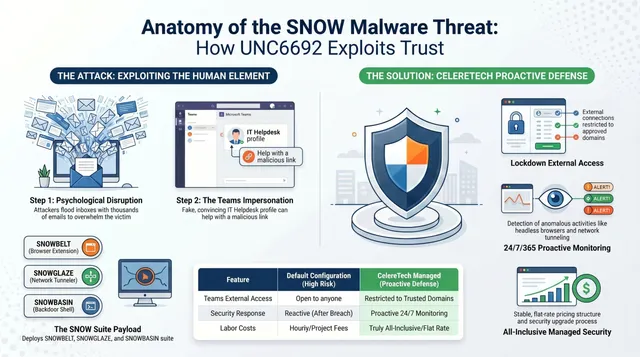
Modern collaboration tools connect your files, calendar, and other apps all in one place — and each connection creates a new entry point for a hacker. The tool TeamsPhisher was built specifically to send phishing messages through Microsoft Teams, and the group Midnight Blizzard tricked employees into approving MFA requests by posing as IT staff.
Check Before You Click
20% of employees admit they don’t check whether a message is real before clicking a link in a team chat. Imagine a message from “Microsoft Identity Protection (External)” asking to chat — that “External” tag is a massive red flag. Your actual IT department wouldn’t reach you from outside your company.
If you respond, you may get a link to “verify your identity” that leads to a fake login page designed to steal your credentials. Instead:
- Verify offline. If a request seems odd, call your IT team or use your official ticketing system.
- No passwords in chat. Never send login info or private data over chat — use a secure, encrypted method instead.
- Watch your hardware. A personal laptop that isn’t managed by your company adds extra risk. Stick to company devices and keep software updated.
Think Before You Share
Memes, emojis, and quick updates are fine for team chat — passwords and private data aren’t. As we rely more on these tools going forward, staying alert, questioning “urgent” requests, and verifying before clicking keeps the convenience without the exposure.
If you have questions or want expert help, reach out to CelereTech. We help small and mid-sized businesses stay secure while still enjoying the tools that make modern work possible.